
Why you're burning through your AI usage so fast

Every time you upload a scanned invoice, paste a full email thread, or hand over a cluttered Excel file with merged cells and colour-coded columns, you’re making the AI work harder.
This habit is costing you more tokens than it should.
The format of your inputs and outputs has a direct impact on token usage, cost, and response quality.
A simple format change can drastically reduce the tokens you’re using.
This table shows how each format affects your token consumption in Claude:
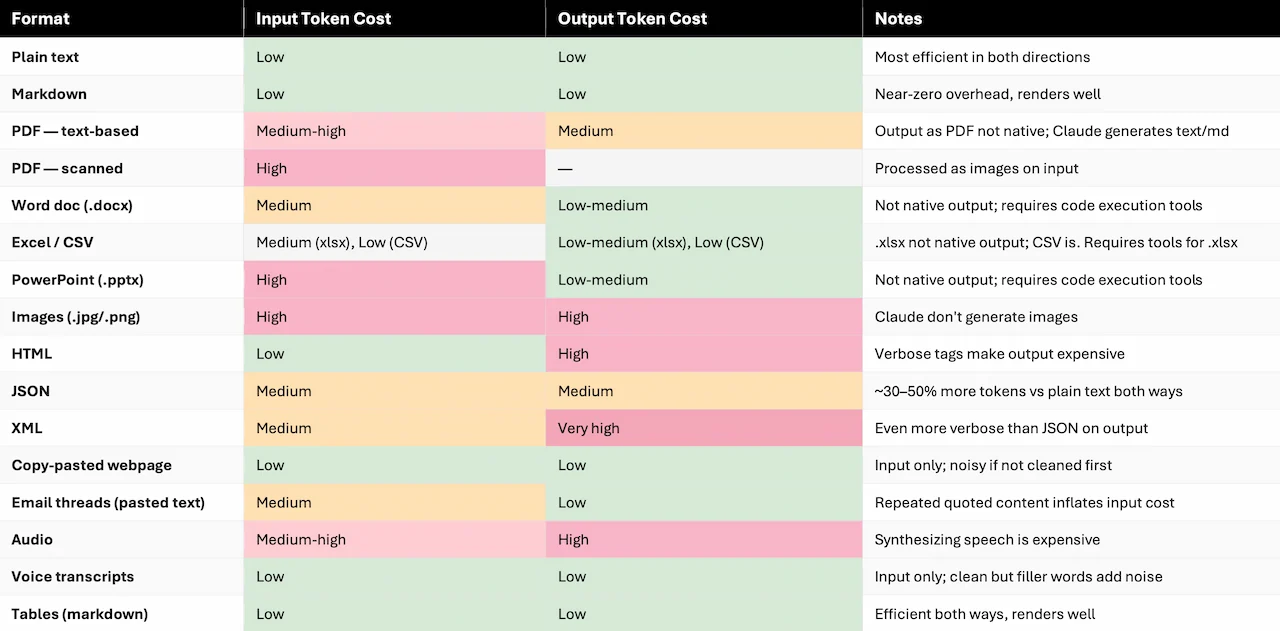
Note that some formats are not generated natively (like PDF, .docx or .pptx). In tool-enabled environments (such as Claude.ai with plugins, or API setups with code execution), these files can be created programmatically as a byproduct of running code. So it usually consumes more tokens.
The costs listed here are estimates and rules of thumb, not exact figures. You can still use this as a general guide to understand what’s expensive vs. what’s not. Remember to check your provider’s pricing page, because pricing varies by model, plan, and provider, and it changes often.
In summary, the closer your input is to clean, flat, linear text, the better the performance and the lower the cost.
On the output side, format choice matters even more. Generating HTML or XML is significantly more expensive than markdown or plain text for equivalent content.
When in doubt, default to plain text or markdown: they’re fast, cheap, and understood natively by every major AI tool.
Want to cut your AI costs and get better outputs without changing your tools? That’s exactly what I can help with. Send me a message or book a free 15-minute call.
The Upgroves newsletter
Want more smart way version in your inbox?
Be the first one to receive practical notes on AI, automation, and business systems. Real ops lessons, useful tools, and the occasional behind-the-scenes note I don't publish publicly.